Lab Session Week-09 – “Getting Familiar with our Robot”
Last Update: 2024-11-04
Prerequisites
Make Sure to Check the Doc written by TA
Make sure your ROS_DOMAIN_ID is unique on your PC, as well as your robot per group
e.g.
|               |    Robot NUC   | member 1 PC | member 2 PC | member 3 PC | member4 PC |
| ------------- | -------------- | ----------- | ----------- | ----------- | ---------- |
|    Group 1    |       22       |      11     |      12     |     13      |     14     |
|    Group 2    |       23       |      91     |      92     |     93      |     94     |
|    Group 3    |       24       |      31     |      32     |     33      |     34     |
|    Group 4    |       25       |      41     |      42     |     43      |     44     |
|    Group 5    |       26       |      51     |      52     |     53      |     54     |
|    Group 6    |       27       |      61     |      62     |     63      |     64     |
|    Group 7    |       28       |      71     |      72     |     73      |     74     |
|    Group 8    |       29       |      81     |      82     |     83      |     84     |
Take Care If You Are a Member of Group 2 !!
Here is a template of a colcon workspace src folder
The structure of src should be like:
src
├── interbotix_ros_core
├── interbotix_ros_manipulators
├── interbotix_ros_toolboxes
├── iqr_tb4_ros
├── pan_tilt_ros
├── realsense-ros
└── witmotion_ros_driver
Please check it carefully
Basic Operations You May Refer to
Hardware Startup
ros2 launch iqr_tb4_bringup bringup.launch.py: Launch the hardware setup
Keyboard Teleopration
ros2 run teleop_twist_keyboard teleop_twist_keyboard: Send velocity command to topic/cmd_vel
Rviz2 Visualization
ros2 launch iqr_tb4_description display.launch.py: Visualize the “digital twin” of the robot
SLAM
ros2 launch turtlebot4_navigation slam.launch.py: Launch slam_toolbox’s slam functionalityros2 launch turtlebot4_viz view_robot.launch.py: Launch rviz2 for visualization during slamros2 run nav2_map_server map_saver_cli -f <name_of_your_saved_map>: Save the map you constructed
Navigation
ros2 launch turtlebot4_navigation localization.launch.py map:=<name_of_your_saved_map.yaml>: Start localizationros2 launch turtlebot4_navigation nav2.launch.py: Launch nav2ros2 launch turtlebot4_viz view_robot.launch.py: Launch rviz2 for visualization during navigation
4-dof Arm
- You should place the arm in a configuration as below before
ros2 launch iqr_tb4_bringup bringup.launch.py:
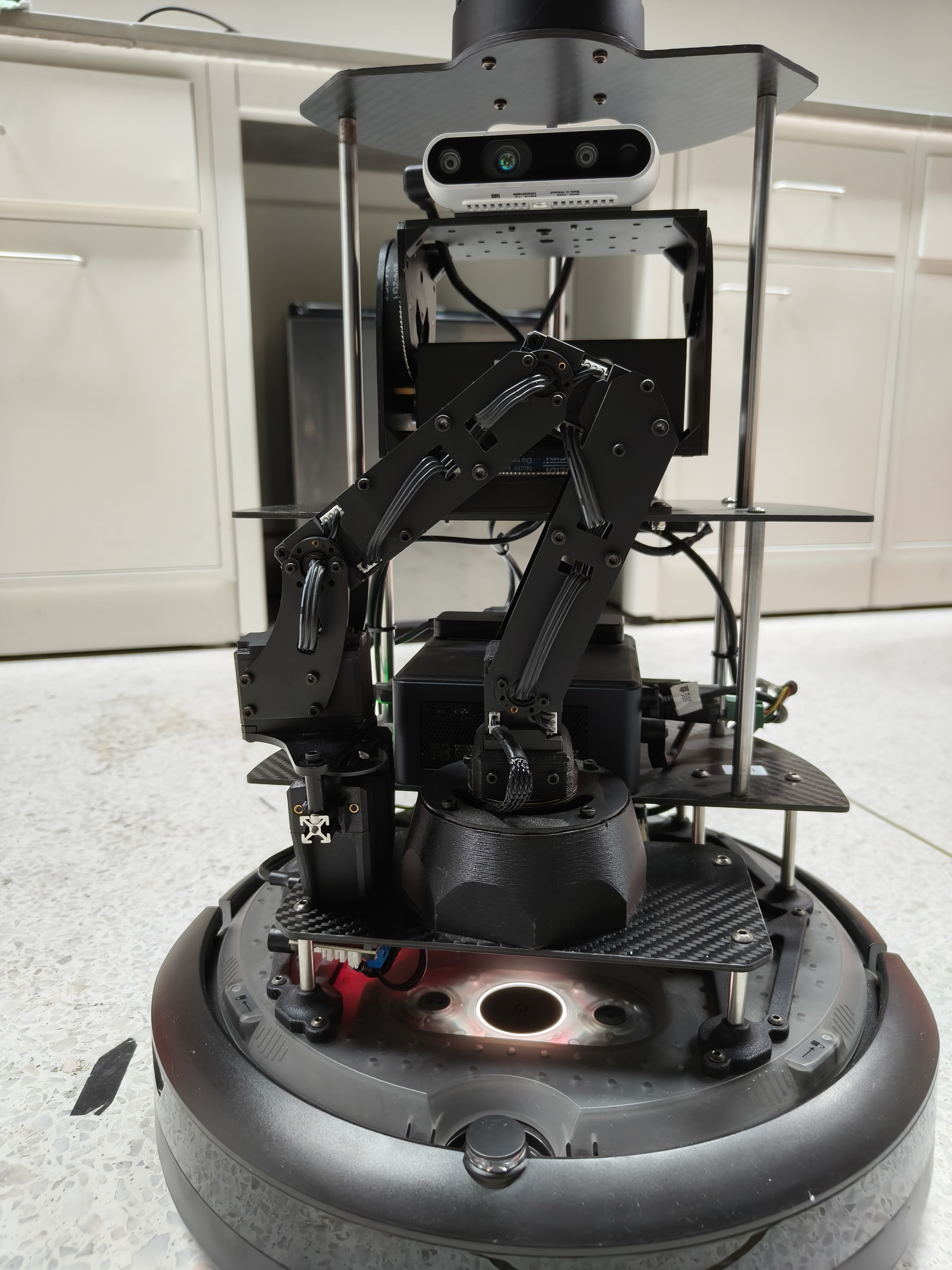
and here is a script that you may find it helpful to control the arm: arm_control_demo.py
Pan-Tilt
ros2 launch pan_tilt_bringup panTilt_bringup.launch.py, then the pan-tilt topics are ready for you, you can publish to the topics to control the pan-tilt.
e.g.
ros2 topic pub /pan_tilt_cmd_deg pan_tilt_msgs/msg/PanTiltCmdDeg "{yaw: 30.0, pitch: 30.0, speed: 5}"
Camera
ros2 run realsense2_camera realsense2_camera_nodeorros2 launch realsense2_camera rs_camera.launch.pyto start the camera node. Then visualize the camera image by using rviz2 or rqt_image_view.