Play with Our Robot Hardware
Last Update: 2025-11-03
Prerequisites
Read this Doc 📑 Robot Hardware Guide
Make sure your ROS_DOMAIN_ID is unique, or LOCALHOST_ONLY
Template workspace src folder
- Download the template code 📜 Template Packages
The structure of src should be like:
src
├── interbotix_ros_core
├── interbotix_ros_manipulators
├── interbotix_ros_toolboxes
├── iqr_tb4_ros
├── pan_tilt_ros
├── realsense-ros
└── witmotion_ros_driver
Please check it carefully
Basic Operations You May Refer to
Hardware Startup
ros2 launch iqr_tb4_bringup bringup.launch.py: Launch the hardware setup
Keyboard Teleopration
ros2 run teleop_twist_keyboard teleop_twist_keyboard: Send velocity command to topic/cmd_vel
Rviz2 Visualization
ros2 launch iqr_tb4_description display.launch.py: Visualize the “digital twin” of the robot
SLAM
ros2 launch turtlebot4_navigation slam.launch.py: Launch slam_toolbox’s slam functionalityros2 launch turtlebot4_viz view_robot.launch.py: Launch rviz2 for visualization during slamros2 run nav2_map_server map_saver_cli -f <name_of_your_saved_map>: Save the map you constructed
Navigation
ros2 launch turtlebot4_navigation localization.launch.py map:=<name_of_your_saved_map.yaml>: Start localizationros2 launch turtlebot4_navigation nav2.launch.py: Launch nav2ros2 launch turtlebot4_viz view_robot.launch.py: Launch rviz2 for visualization during navigation
4-dof Arm
- You should place the arm in a configuration as below during rest:
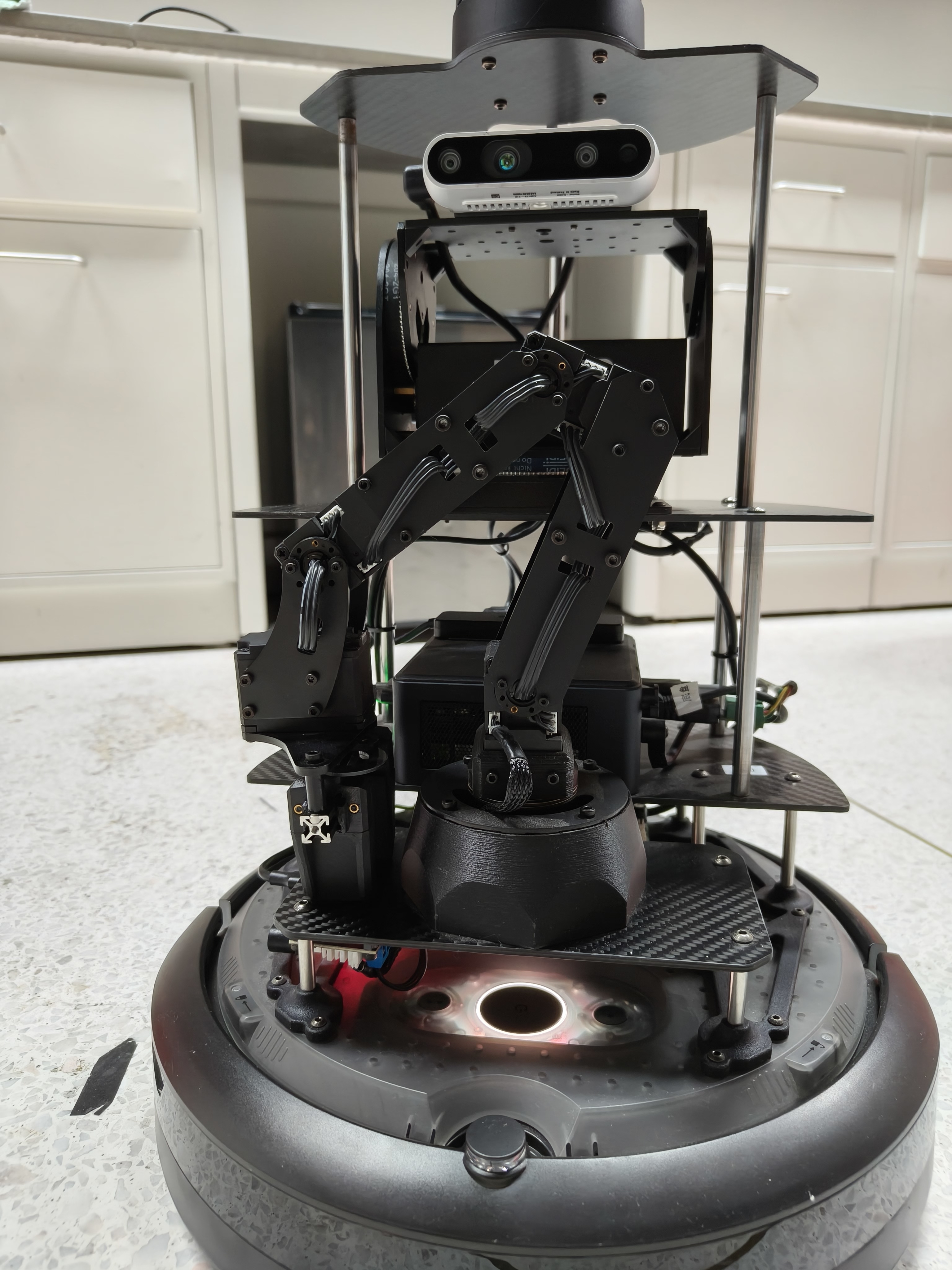
- Here is a demo script that shows how to control the arm: 📜 arm_control_demo.py
Pan-Tilt
ros2 launch pan_tilt_bringup panTilt_bringup.launch.py, then the pan-tilt topics are ready for you, you can publish to these topics to control the pan-tilt.
e.g.
ros2 topic pub /pan_tilt_cmd_deg pan_tilt_msgs/msg/PanTiltCmdDeg "{yaw: 30.0, pitch: 30.0, speed: 5}"
Camera
ros2 run realsense2_camera realsense2_camera_nodeorros2 launch realsense2_camera rs_camera.launch.pyto start the camera node. Then visualize the camera image by using rviz2 or rqt_image_view.